
Free Video to Text Converter with Timestamps.
Turn any video into searchable, timestamped text. Paste a public URL or upload a file — no sign-up needed.
Convert video to text without signing up first.
Free guest access · Rapid repeat requests may pause for up to 60 seconds.
From video file or URL to timestamped text.
- 1
Paste a URL or upload a file
Start with a public YouTube URL, podcast URL, or audio/video file up to 25 MB.
- 2
Convert speech to text
The workspace retrieves or transcribes the audio and organizes it into timestamped segments.
- 3
Search, copy, and verify
Read the transcript, open any timestamp to check the original context, or export as Markdown.
A converter that keeps the source within reach.
A video to text converter makes spoken content searchable by turning audio into written text. Most converters stop there — the text becomes a dead end rather than a starting point.
ProofLink keeps the source attached. Every segment carries a timestamp that links back to the original moment, so a converted transcript remains a living document you can verify rather than a wall of text you have to trust.
What a timestamped conversion is useful for.
Research
Extract and cite specific passages with timestamps your readers can verify.
Study
Build notes from a lecture or tutorial that retain the original time context.
Work
Convert meeting or interview recordings into searchable text you can reference later.
The speaker defines the core problem before introducing any solutions.
A case study is used to illustrate why the first approach failed.
The final recommendation is qualified with specific conditions for when it applies.
What a video to text converter actually does.
A video to text converter takes spoken audio from a video and turns it into written text. The output is a full transcript, not a summary — every word that was said stays in the document.
Timestamps are the part that separates a useful conversion from a text dump. Each line of the transcript carries a start time, so instead of guessing where something was said, you click the timestamp and go straight to that moment in the video.
ProofLink converts videos from YouTube URLs, podcast feeds, or uploaded audio and video files. The transcript is the primary output. A grounded summary becomes available after the transcript is ready, and every key point in that summary links back to the segment it came from.
How to convert a video to text.
The first step is choosing a source. Paste a public YouTube URL, a podcast URL, or upload an audio or video file up to 25 MB. All three paths produce the same kind of output — a timestamped transcript.
For YouTube and podcast URLs, the workspace requests available transcript data from authorized providers. If a transcript already exists for that video, it is normalized into a consistent format with start times.
For uploaded files, the audio is sent to a transcription provider and returned as timestamped segments. The resulting transcript looks the same as one from a YouTube URL — same structure, same timestamp behavior.
Once the transcript is ready, you can search it by keyword, copy text with or without timestamps, and generate a grounded summary from the same workspace.
Video to text converter vs. video transcription.
Both terms describe the same thing. 'Video to text' is what most people type into a search engine; 'video transcription' is the more technical name for the same process.
Either way, the result is a searchable transcript with timestamps. The naming difference does not affect what the workspace actually produces.
ProofLink uses the same conversion engine for both phrases. The page you are on right now targets the search term 'video to text converter' specifically — that is the phrase with meaningful monthly search volume.
What to check after converting.
Timestamps let you verify the transcript without rewatching the whole video. Open a segment, listen to that short section, and confirm the wording is right before using the text.
AI transcription can mishear uncommon names, technical terms, numbers, or overlapping speakers. If you are planning to quote or cite anything specific, check that segment before you use it.
For the grounded summary: each key point has a timestamp. Click it to read the surrounding transcript context. If the summary says 'the speaker argues X' and the transcript at that timestamp says something different, the summary is wrong.
ProofLink surfaces the evidence. Reading it is still your job.
When a timestamped conversion is useful.
Research: pull direct quotes from a video for a paper or brief. Every quote comes with a timestamp your reader can click to hear the original context. This is a stronger citation than a page number.
Study: convert a lecture or tutorial into searchable notes. When you encounter a term you do not recognize, search the transcript to find where it was first explained, then jump to that moment.
Work: interview recordings, meeting notes, and webinar recordings become searchable documents. Instead of replaying a 90-minute call to find one decision, search the transcript and open the exact minute.
The timestamp is the connective tissue. Without it, a transcript is just text. With it, the text becomes a route back to the original recording.
Timestamped text instead of unstructured output.
Each segment carries its start time so you can navigate the original recording from any point in the transcript.
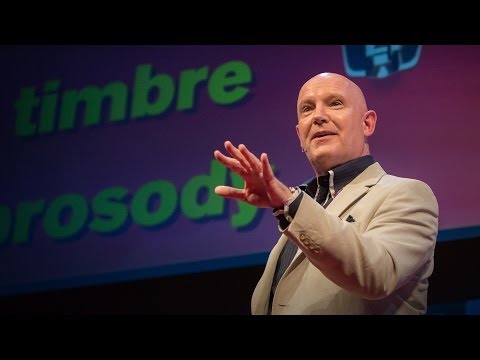
Julian Treasure opens with a practical question: how can we speak in a way that makes people want to listen?
He names habits that make communication harder, from gossip and judging to exaggeration and complaint.
The alternative is HAIL: honesty, authenticity, integrity, and love—four foundations for speaking with trust.
A simple vocal toolbox—register, timbre, prosody, pace, pitch, and volume—helps turn an intention into a clearer message.
What this lesson teaches
Julian Treasure explains how to make speech more worth listening to: remove habits that erode trust, lead with HAIL, then use a few deliberate vocal tools.
Key concepts and takeaways
- Avoid the habits that make listeners tune out.
- Build trust with honesty, authenticity, integrity, and love.
- Use pace, pitch, and volume with intention.
Review checklist
Notice one communication habit that may be making listeners disengage.
Practice one vocal variable before your next important conversation.
Lesson chapters
Important source moments
Questions about converting video to text.
What video formats does the converter support?
Paste a public YouTube URL or podcast URL, or upload an MP3, MP4, M4A, WAV, OGG, WEBM, MPEG, MPGA, or FLAC file up to 25 MB. The output is the same regardless of input method — a timestamped, searchable transcript.
Are the timestamps accurate?
Timestamps reflect the start of each transcript segment. They are generated from the audio transcription process and allow you to jump to the corresponding moment in the original recording.
Can I copy the converted text?
Yes. The transcript can be copied with or without timestamps, and the complete workspace can be exported as Markdown.
Is the conversion free?
Yes. Free guest access is available. There are no paid plans. To keep the service reliable, rapid repeat requests may pause for up to 60 seconds.
What is the difference between video to text and video transcription?
Both describe the same result — spoken audio written down as text. 'Video to text' is the phrase most users search with; 'video transcription' names the underlying process. Either term leads to the same timestamped transcript.
Does converting a video to text also give me a summary?
A grounded summary becomes available after the transcript is ready. Key points in the summary link back to the transcript segments they were generated from, so you can verify each point before relying on it.