
YouTube Transcript Generator with Timestamps.
Get, extract, and reuse an available YouTube transcript that stays connected to the original playback timeline.
No YouTube account or AI Video Summarizer sign-up required for the first result.
Free guest access · Rapid repeat requests may pause for up to 60 seconds.
Extract a YouTube transcript from a public URL.
- 1
Paste a public URL
Use a public youtube.com or youtu.be video link.
- 2
Extract available text
AI Video Summarizer validates the video and requests an authorized transcript source.
- 3
Copy or export the transcript
Read segments, click timestamps, copy clean text, or export the completed workspace as Markdown.
A YouTube transcript should stay useful beyond the watch page.
A YouTube transcript helps when you remember a phrase but not where it appeared, or when you need to review a section without replaying the entire video. A transcript extractor should make that text practical to search, revisit, copy, and export without detaching it from the original source.
AI Video Summarizer normalizes available YouTube transcript segments into a consistent workspace and keeps each row connected to the source moment. Copy the timestamped version for verification, copy clean text for reading and editing, or export the completed workspace as a Markdown file for later reference.
Extract, check, and reuse spoken information.
Extract a tutorial step
Scan for the step or term you need, then open that moment.
Review a lecture transcript
Read difficult passages and replay the surrounding explanation.
Check and export a quote
Confirm wording and context before citing, discussing, or saving it.
Begin with the outcome you want the workflow to produce.
Remove steps that add coordination but do not improve the result.
Document the decision so the next iteration starts with context.
A YouTube transcript organized by time.
Transcript segments are normalized into readable rows even when providers return different source formats.
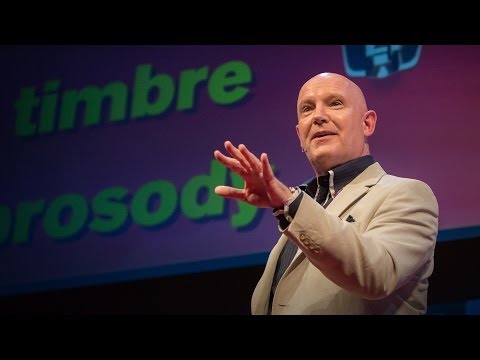
Julian Treasure opens with a practical question: how can we speak in a way that makes people want to listen?
He names habits that make communication harder, from gossip and judging to exaggeration and complaint.
The alternative is HAIL: honesty, authenticity, integrity, and love—four foundations for speaking with trust.
A simple vocal toolbox—register, timbre, prosody, pace, pitch, and volume—helps turn an intention into a clearer message.
What this lesson teaches
Julian Treasure explains how to make speech more worth listening to: remove habits that erode trust, lead with HAIL, then use a few deliberate vocal tools.
Key concepts and takeaways
- Avoid the habits that make listeners tune out.
- Build trust with honesty, authenticity, integrity, and love.
- Use pace, pitch, and volume with intention.
Review checklist
Notice one communication habit that may be making listeners disengage.
Practice one vocal variable before your next important conversation.
Lesson chapters
Important source moments
Questions about YouTube transcripts.
Which YouTube links are supported?
AI Video Summarizer accepts common public youtube.com and youtu.be URL formats and validates the canonical video ID.
Why might a transcript be unavailable?
The video may be private, restricted, unsupported, or lack transcript access through the configured authorized provider.
How do I generate a YouTube transcript?
Paste a public YouTube URL into the form, wait for the available transcript to be processed, then read or copy the timestamped segments from the result workspace.
What is a YouTube transcript extractor?
A YouTube transcript extractor retrieves available spoken text from an eligible public video and organizes it into readable segments. This tool keeps timestamps beside the text so you can return to the corresponding source moment.
Does the YouTube transcript generator work for every video?
No. The video must be eligible for access and have transcript text available through the configured authorized provider. Private, restricted, or unsupported videos may not produce a result.
Does AI Video Summarizer use undocumented YouTube endpoints?
No. Transcript acquisition is isolated behind a replaceable provider and is designed around authorized access paths.
Can I jump from text to YouTube?
Yes. Timestamp controls are designed to seek the embedded video to the corresponding moment.
Can I copy a YouTube transcript without timestamps?
Yes. Use Copy without timestamps for clean transcript text, or keep the timestamped copy when you need to check the source moment.
Can I download a YouTube transcript?
You can export a completed workspace, including its available transcript, as a Markdown file or save it as a PDF. Subtitle formats such as SRT and VTT are not currently exported.
Is this a free online YouTube transcript generator with no sign-up?
Your first eligible result can be generated without a YouTube account or AI Video Summarizer sign-up. Availability still depends on public access and an authorized transcript source.